
How long does it take to set up Patchstack?
Less than 2 minutes. You can easily install Patchstack on your WordPress application connected to the Zone+. To install, choose Zone+ in the My Zone control panel and then choose Patchstack from the WordPress plugins.
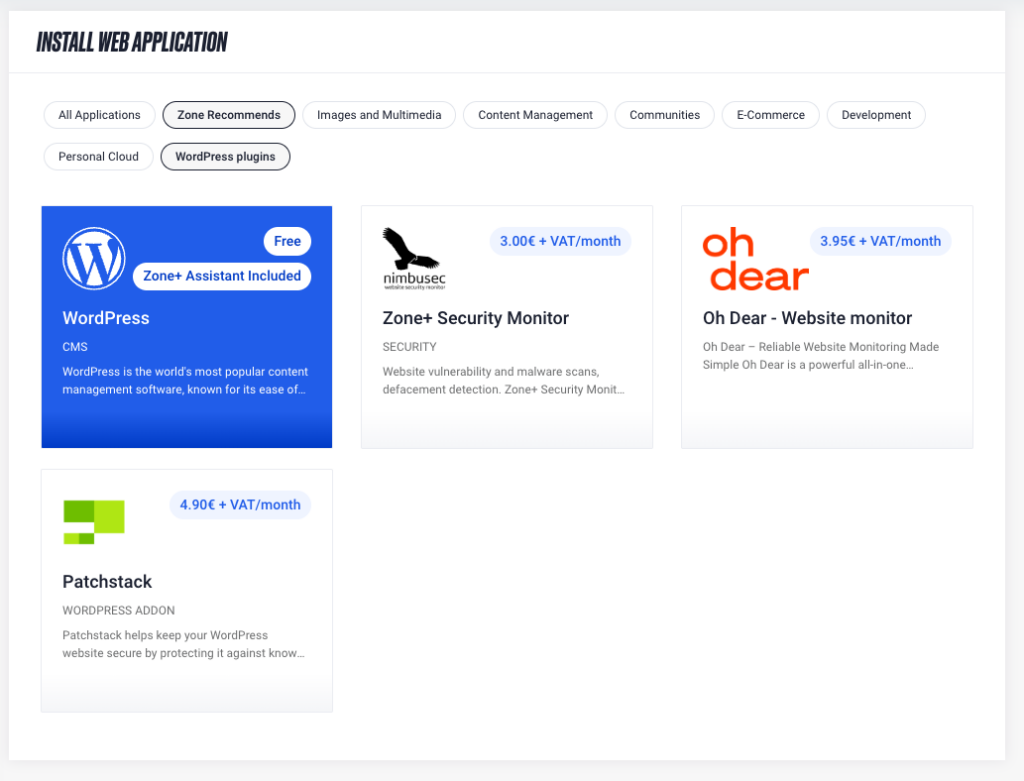
What should I do if my WordPress application is not visible in the Zone+ application manager?
If your WordPress application was installed manually and is not visible under Zone+, it can be imported into Zone+. There are two options:
-
You can import WordPress in the My Zone control panel by choosing
Web Hostingon the overview page, thenWeb Applicationsin the left-hand menu, and clickingImport WordPress.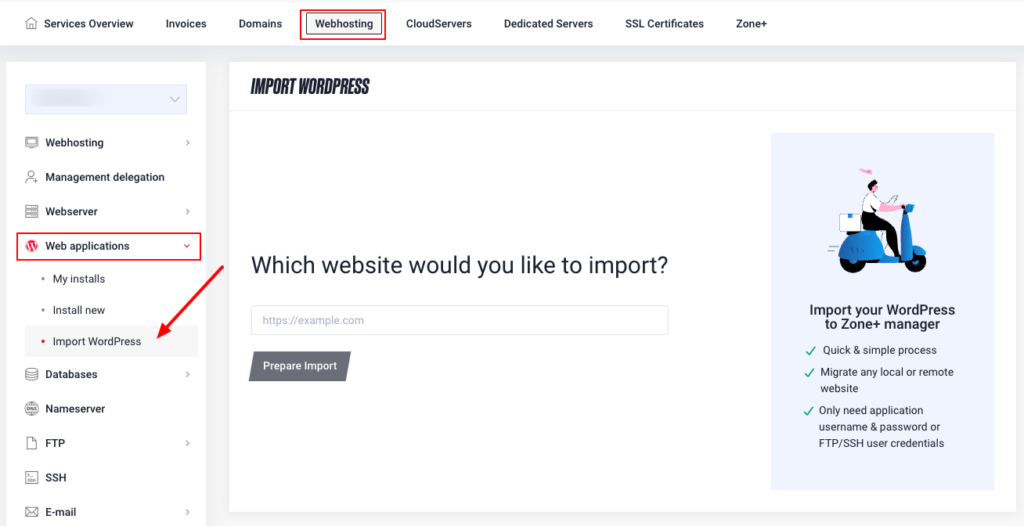
-
If you are unable to import WordPress on your own, please contact our customer support at info@zone.ee.
Do I need to modify my theme or plugins?
No. That’s one of Patchstack’s biggest advantages – no code changes at all. The plugin works independently and does not touch your theme or other plugins. Your WordPress setup stays exactly the same, just better protected.
Does Patchstack work with other security plugins and tools?
Yes. Patchstack integrates smoothly with other security solutions. It focuses specifically on fast vulnerability detection and prevention, without causing conflicts or interfering with your existing tools.
Is Patchstack a web application firewall (WAF)?
Not exactly – and that’s actually its strength. Traditional web application firewalls rely on broad, pattern-based rules. This means they can either miss real threats or, on the other hand, block perfectly legitimate requests (so-called false positives).
Patchstack takes a different approach. It analyses which WordPress plugins and themes your website is using, identifies the vulnerabilities related to them, and applies targeted protection tailored specifically to your website. The result is more precise, smarter, and far more effective protection.
Does Patchstack modify my website’s code?
No. Patchstack does not modify or overwrite any files. It works before malicious requests reach your website, blocking harmful traffic at the entry point. Your website’s code and content remain completely untouched.
Do I still need Patchstack if I already use a firewall?
Yes – Patchstack complements your firewall rather than replacing it. Firewalls are effective at filtering bot traffic and mitigating DDoS attacks. However, they are not designed to handle specific WordPress vulnerabilities. Vulnerabilities are flaws in application logic, and exploiting them often looks like perfectly normal traffic – something a generic firewall cannot reliably distinguish. Patchstack is specialised in exactly these scenarios, providing targeted protection where traditional firewalls fall short.
My website isn’t well known — why would anyone attack it?
In reality, attackers don’t choose websites manually. Most attacks are fully automated and target any website that uses a plugin or theme with a known vulnerability. If your website includes such a component, it becomes a target – regardless of how large, small, or well known it is. Patchstack helps stop these attacks before they ever become a problem.
Will Patchstack slow down my website?
No. Patchstack applies mitigation rules only when a specific vulnerability is actually present on your website. Even when many rules are active at the same time, modern PHP versions handle this extremely efficiently, with no noticeable impact on performance. Simply put: your website stays fast, while security runs quietly in the background.
I already use security monitoring. Why do I also need Patchstack?
Security monitoring tools are mainly designed to observe and report issues after they occur. They alert you when something goes wrong, but they don’t actively stop attacks from happening.
Patchstack works differently.
It focuses on preventing attacks before they happen by protecting your WordPress website against known vulnerabilities in plugins and themes. The best results come from using both together: server-level malware scanning and monitoring for detection, and Patchstack for proactive, automatic protection against WordPress vulnerabilities.
In other words, these solutions don’t replace each other – they complement each other to provide stronger overall security.
Is there any delay in protection against new threats?
No. Because Patchstack maintains one of the world’s largest WordPress vulnerability databases, users often receive protection before a vulnerability is widely disclosed. This means your website can be protected even when an issue is not yet public.
Can I get help if something goes wrong?
Yes. We recommend first contacting Patchstack’s own support team, as they can provide the most accurate guidance regarding the service and its configuration:
Fastest protection for WordPress security vulnerabilities – Patchstack
We also recommend reviewing the official Patchstack documentation: Start using Patchstack | Patchstack Docs
If you need additional assistance or if the issue is related to the Zone+ management, our customer service is always ready to help. You can contact us via email, phone, or live chat.