
Brand Indicators for Message Identification (BIMI) is a fresh and hot off the press email standard which makes it possible for companies to use their brand within email clients that support BIMI. BIMI provides a nice way to gain more brand visibility and to some extent also help protect users against impersonation.
BIMI relies heavily on preexisting standards such as SPF, DKIM and DMARC. BIMI logos will not displayed for letters that do not align with DMARC. DMARC deployment is a prerequisite for BIMI. After all, one of the goals of BIMI is to reduce impersonation.
BIMI is also supported by most large providers, such as Apple Mail, Google Gmail/Gsuite and Yahoo. You can find a full list of vendors that support BIMI here.
Technical requirements
BIMI requires a “strict” DMARC policy, letters that do not align with the policy must be quarantined (p=quarantine) or rejected (p=reject). DMARC must be enforced for all letters, the pct value must not be below 100(%).
Because BIMI does increase trust in the sender’s authenticity, most providers require a VMC (or a CMC) certificate. Same goes for Zone Webmail. You can find more information about BIMI for senders, including VMCs here.
Displaying BIMI in Webmail
Zone Webmail will display BIMI graphics only if the logo comes with a Verified Mark Certificate (VMC) or a Common Mark Certificate (CMC) and passes all of BIMI standard’s requirements of authenticity. Meaning that the letter must align with the domain’s DMARC (and contains a valid relevant DKIM signature).
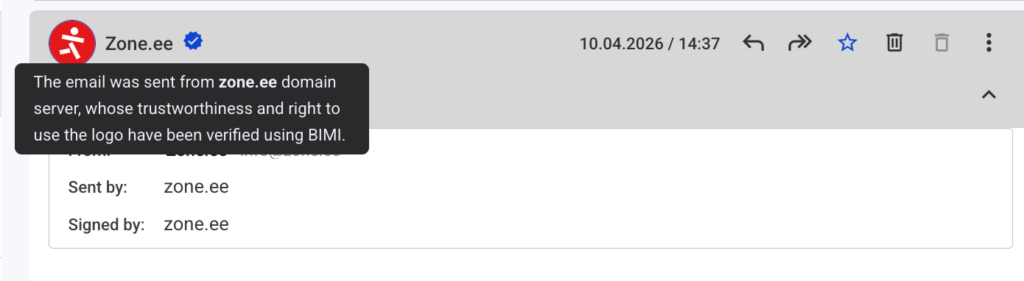
If a domain uses the BIMI standard together with a valid VMC (Verified Mark Certificate), Webmail displays the domain logo and the corresponding badge next to the sender.
This means that:
- the sender’s domain uses proper DMARC and DKIM authentication;
- the domain owner has verified the right to use the displayed logo;
- the email was sent from a server authorized to send messages on behalf of that domain.
In Webmail, the BIMI logo is visible in the email list when using the three-pane view:

The BIMI certificate is also visible in an opened email as the contact icon.
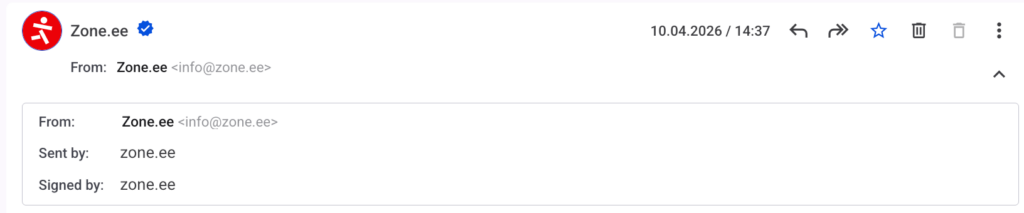 For additional information, hover your mouse over the blue button/badge next to the sender’s name:
Additional information
If you have deployed BIMI and Webmail isn’t displaying it or if you wish to deploy BIMI and would like help, contact us as sales@zone.ee.